
Gunner Bones
-
Posts
52 -
Joined
-
Last visited
Everything posted by Gunner Bones
-
It did not work, even without StarMine it still froze at Galacticraft planets. I don't think StarMine was the problem, it was working fine before. Ill remove Galacticraft and re-add StarMine. And Mekanism, I've been wanting to get that in too.
-
I downloaded the version from that site, and still the Galacticraft Planets freeze. I'll try removing it to see if that resolves the issue.
-
Download
-
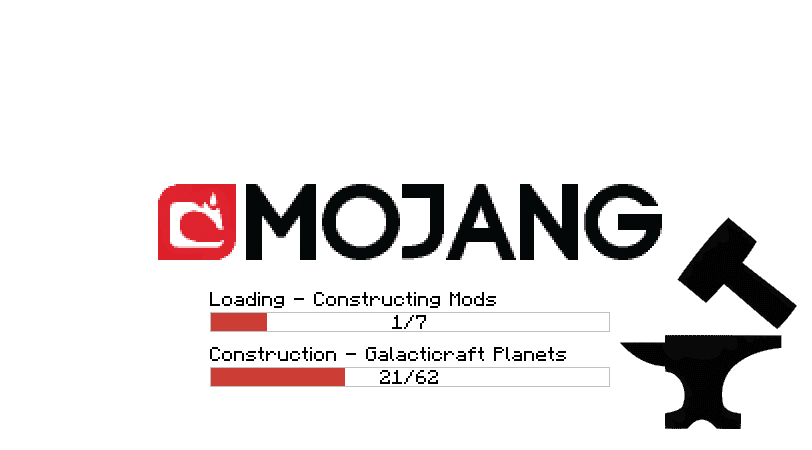
I do not know how it works on your computer, or if it's just my computer, but it does not load. It always freezes at loading Galacticraft Planets (picture attached) and it will not load. I tried resetting the pack, and deleting and re-installing, but it is not working on mine. I'm running a Mac OSX 10.9.5 with Java 7.

-
Download
-
I had to update NEI and CodeChicken again, but no worries. However, when I ran Minecraft, it froze when loading Galacticraft Planets, then crashed. Crash report attached. crash-2015-05-23_16.22.14-client.txt
-
Thanks for that! I actually decided I will not put in the morph mod since it casues lags on servers, however I'll be adding Tinker's Construct instead. And since I don't need morph, I don't need iChunUtil. Ill let you guys know what happens.
-
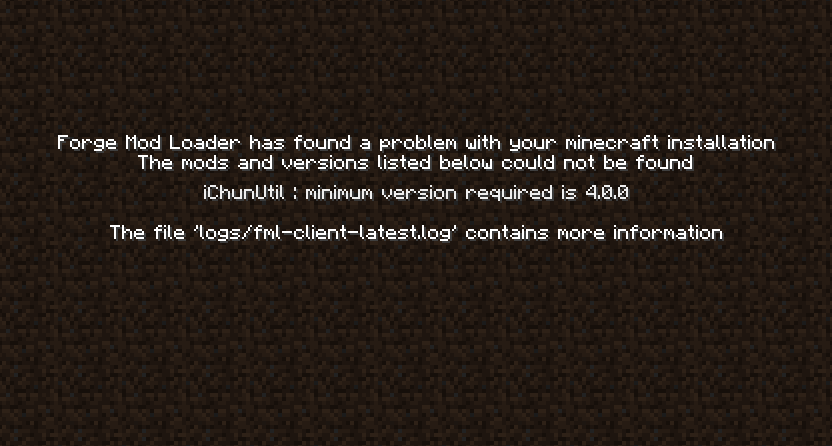
I did all of the requested things, and Minecraft downloaded the modpack successfully. However, after a minute in the loading screen, Minecraft stopped saying I need iChunUtil minimum version 4.0.0. This is a phenomenon, this happens to keep occurring to me. When I wanted to try the Doors mod on my modded client, Minecraft crashed saying I need iChunUtil, when I indeed had the mod version 5.0.0. In this case, I have version 5.3.0, and it says I need at least version 4.0.0. I made sure it was in there. Why does this keep happening? On the bright side, we're almost done! Attached is the crash message when loading Minecraft.
-
I have done all of that and uploaded the new version, and got it to technic. Technic now loads the modpack.zip, however when it gets to 11% on installing mods it stops/crashes and brings me back to my modpacks. https://copy.com/gQpgMOGkiLIbcXnH < New download link (Not direct) Update: Now it loads mods 37% before crashing
-
Ok, I have gotten the latest version of all the mods and forge, and moved code chicken. When you mean the top folders are bin, config, and mods, do you mean create a zip of only those 3 folders, not the folder with those 3 folders? Ill try that and record results
-
Ok, I tried to figure this out on my own, and I got it successfully to the technic launcher. New mod list (some had to be left out due to crashes) includes: All-U-Want, StarMiner, Buildcraft, Carpender's Blocks, CoFH Core, CustomNPCS, Galacticraft, GilbysVC, iChunUtil, Magical Crops, MineFactory Reloaded, Morph, NEI, Orespawn, Project Red, Thaumcaft, Thermal Expansion, and WAILA. Somehow I managed to upload the modpack: https://copy.com/AKjsm3mJGCXRaQzp/GunnersMechmagicalModpack.zip?download=1 (Direct Download) Modpack: http://www.technicpack.net/modpack/gunner-mechmagical-modpack.658517 However, when I first installed it on Technic Launcher it loaded to 2% then started over, then did that twice more, then said error downloading.
-
Anyways, I just got all the config files I need, and I have the mods. Do I make 3 folders, mods, config, and bin, and upload that?
-
Sigh, im sending the wrong message. I just don't know what an API is, and how that's different then uploading it to a file saver website like copy.com. I already have technic launcher, and vanilla mine craft with forge. I know how to use that too, or else I would've not been able to make my first pack. All I need to know is what an API is and how it is different. I already said that I cannot upload my modpack file to copy.com because it is too big.
-
No, I don't. I thought you could only access that if you upload it to technic launcher.
-
Sorry if I did not specify what I meant to say on my last message: I do not know what an API link is
-
I'm a bit new with this modding stuff, correct me if I'm wrong, but an API lets you get a copy of my server file. I can't upload it to technic with that big of a file, since copy.com keeps failing to do so, do you just want a blank file and you can fill the rest?
-
Yes, I have the server file. However, I cannot upload it because all the file storing/sharing sties say this file is too big, and it's been taking hours to just upload it. I still haven't gotten it uploaded
-
UPDATES: I'm removing some of the mods that are causing problems just to see if the rest work. However, when I removed Mekanism, SAPManPack, and Clay Soldiers, Minecraft actually crashed with the report. It said: java.lang.NoClassDefFoundError: cpw/mods/fml/common/ITickHandler, so I don't know what mod caused that
-
I made sure they're all the right version. Most people have responded to this scenario by updating Java, so now I'm on Java 8 but same problem. I removed only Mekanism just to see if this works successfully, and it said I needed to download another mod for one of my mods, SAPManPack. Minecraft crashes again, with the same error: java.lang.UnsupportedClassVersionError: de/sanandrew/core/manpack/init/ManPackLoadingPlugin : Unsupported major.minor version 51.0 Why does the client do dis to me??? Gunner
-
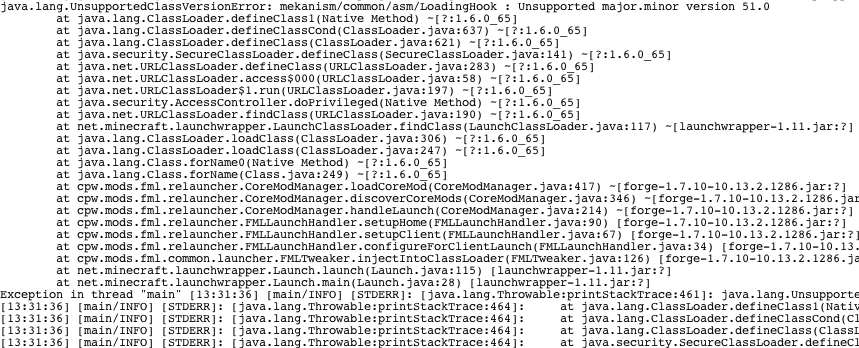
Hello all, Firstly I want to say thanks to plowmanplow for help with my first modpack, now I have the confidence to make another! I'm making a big modpack for my server that my community can pay on, mainly following machinery mods and some other fun mods. One mod I like that I'm adding is Mekanism, and it's giving me a hard time. I am trying all the mods I want to use on the regular Minecraft launcher with forge to gain the config files for my server, and to make sure they work well together. The mods I am using are: All-U-Want, Starminer, Buildcraft, Carpenter's Blocks, Clay Soldiers, CodeChicken, CoFHCore, CustomNPCS, Galacticraft, iChunUtil, Magical Crops, Mekanism, MineFactory Reloaded, Modular Powersuits, Morph, Nether Ores, Orespawn, Project Red, Thaumcraft, Thermal Expansion, Lucky Blocks, WAILA, NEI, Baubles, ForgeMultipart, and MrTJPCore. When I did my first run on regular Minecraft with forge, a screen appeared after loading the config files saying something about needing "CodeChicken lib", (I already have CodeChickenCore), then it crashed with a crash output. The second time it just crashed, nothing about lib, with the same crash message. At the top it said an error occurred in the mine craft directory, followed by "java.lang.UnsupportedClassVersionError: mekanism/common/asm/LoadingHook : Unsupported major.minor version 51.0", meaning it has something to do with Mekanism. I made sure all the .jars are for my version (1.7.10) and I had the correct coremods. Does anyone know how to solve this? Or do I just not need config files and can I just put the mods in my modpack? Thanks, Gunner PS Attached is a sample of the crash report on the launcher
-

How do I create a server with my custom modpack?
Gunner Bones replied to Balliztica's topic in Server Op Swap Shop
What does go into the /libraries/ folder? -
How do I create a server with my custom modpack?
Gunner Bones replied to Balliztica's topic in Server Op Swap Shop
Hello! I just need a modpack server for people who want to download this, not for me. I just need to make sure this works. I did all of the steps (except I used Cauldron, thats what MCPC+ now is apparently) however when I clicked on Cauldron, it said "Unable to Run". Is that a problem? Download Server Link Gunner PS I have made another server file in attempt before I read this (The forums were down) should I use this instead if it's already right? Server Download -
Hello again, and thanks for that! I am almost done! I moved those three mods into 1.7.10 and I re-downloaded OreSpawn and LuckyBlocks. Minecraft got past the black screen and went to the Mojang screen, and I was viewing the monitor to make sure it runs well. It went pretty far, then it crashed however saying this in the monitor: [B#283] # [B#283] # A fatal error has been detected by the Java Runtime Environment: [B#283] # [B#283] # SIGBUS (0xa) at pc=0x0000000109485fe6, pid=507, tid=4867 [B#283] # [B#283] # JRE version: Java(TM) SE Runtime Environment (8.0_05-b13) (build 1.8.0_05-b13) [B#283] # Java VM: Java HotSpot(TM) 64-Bit Server VM (25.5-b02 mixed mode bsd-amd64 compressed oops) [B#283] # Problematic frame: [B#283] # C [libzip.dylib+0x2fe6] newEntry+0x154 [B#283] # [B#283] # Failed to write core dump. Core dumps have been disabled. To enable core dumping, try "ulimit -c unlimited" before starting Java again [B#283] # [B#283] # An error report file with more information is saved as: [B#283] # /Users/USER/Library/Application Support/technic/modpacks/lucky-blocks-challenge/hs_err_pid507.log [B#283] Compiled method (nm) 44811 3510 n 0 java.util.zip.ZipFile::getNextEntry (native) [B#283] total in heap [0x000000010a432b50,0x000000010a432e98] = 840 [B#283] relocation [0x000000010a432c70,0x000000010a432cb0] = 64 [B#283] main code [0x000000010a432cc0,0x000000010a432e98] = 472 [B#283] # [B#283] # If you would like to submit a bug report, please visit: [B#283] # http://bugreport.sun.com/bugreport/crash.jsp [B#283] # The crash happened outside the Java Virtual Machine in native code. [B#283] # See problematic frame for where to report the bug. [B#283] # UPDATE: After that crash Minecraft now successfully loads with everything I want. Huh, I guess it sorted itself out? I hope that doesn't happen to people doing this first time. Thanks for all the help, Gunner
-
Thanks for the help! I did that and believe it or not my mod pack loaded. However when it loaded the second window with Minecraft, it briefly showed the black screen and crashed, saying "There was a severe problem during mod loading that has caused the game to fail". (Crash report attached) crash-2015-04-01_14.36.14-client.txt
-
Hello, I am having troubles creating mod packs. I have done everything the tutorials ask, and whichever method I'm trying is not working. This is my third attempt on a mod pack, and created a big world for this pack and I really want this to be a mod pack so it's easier for people to access this. My method that I thought would work was renaming the forge.jar to modpack.jar and putting it in bin, while the mods go in mods and core mods go in coremods. I used Copy.com as the source because Dropbox and Google drive are not helpful. I made sure I copied the download link and pasted it into Technic. I know it would've worked because when I tried using just NEI, Technic successfully downloaded it but kept crashing on attempting to play it. When I tried all of the mods Technic couldn't find the source. Does anyone know a better solution???? Thanks, Gunner Modpack Link from Technic: http://api.technicpack.net/modpack/lucky-blocks-challenge Download link from Copy.com: https://copy.com/HcQ9EaYd0vBfay7N/LuckyChallenge.zip?download=1 Modpack Information: http://www.technicpack.net/modpack/lucky-blocks-challenge.627397